IIf you are using AI coding agents to build complex web applications, you already know the pain of “Context Window Tax.” Every time your agent...
IIf you are using AI coding agents to build complex web applications, you already know the pain of “Context Window Tax.” Every time your agent has to ingest entire codebases, like custom WordPress plugins, SaaS vibecoding, or massive JS libraries, your credit balance drops fast.
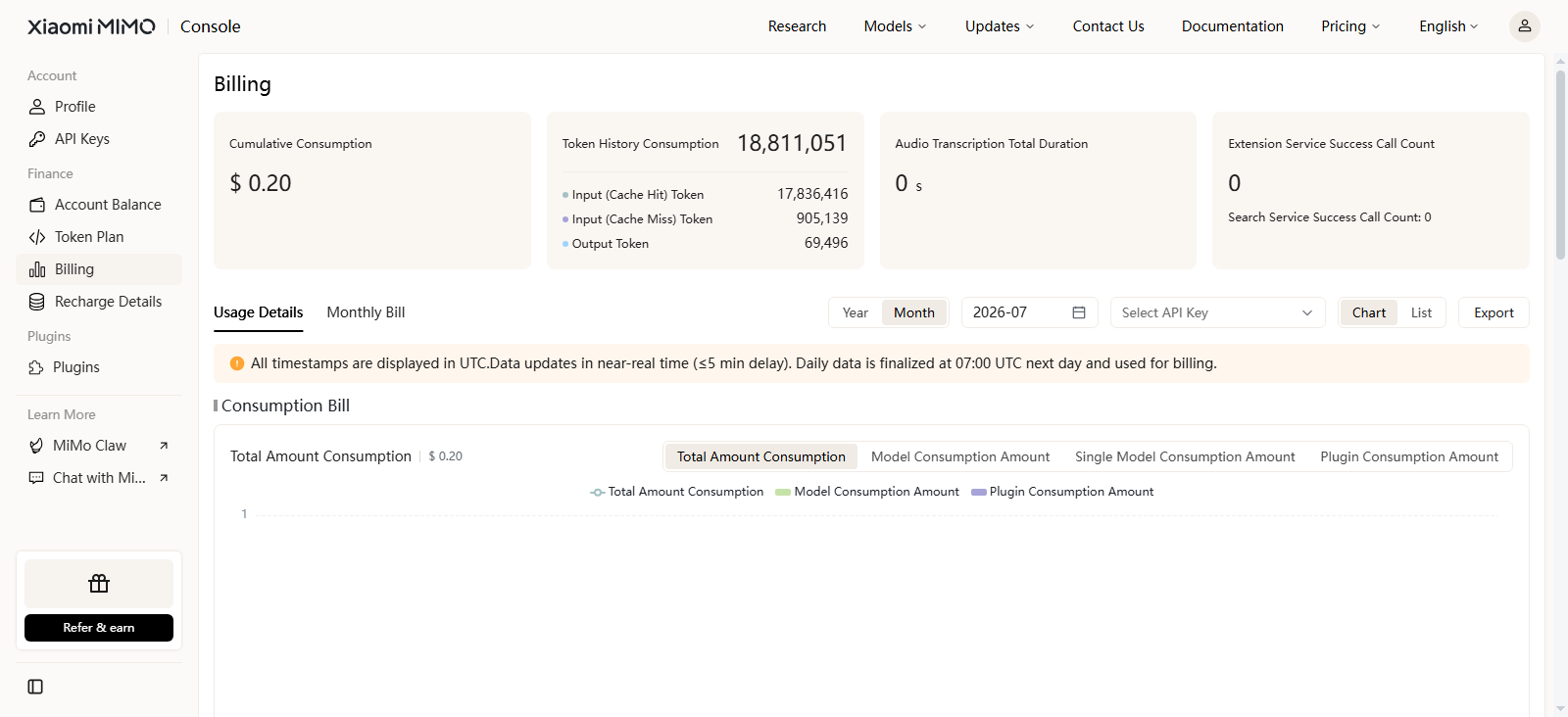
This article shares a precise, production-tested technique I used to drastically reduce AI API costs by mimo 2.5 free API credit, allowing me to process 18.8 Million tokens for exactly $0.20.
This is not a budget model tradeoff; it is an architectural hack that lets you use elite-level models (like MiMo 2.5 free/Pro) for pennies. Here is what this setup gets you, the exact math, and how to configure it in your IDE today.
What’s in it for You? (Why You Should Care About Context Caching)
Switching your primary agent harness to a cache-optimized API like MiMo 2.5 changes your development velocity. Instead of micro-managing your AI prompts to save money, you get:
- Unlimited “Vibe Coding” Runway: Let your agent run continuous, multi-step terminal commands. If it hits an error, let it self-correct and try again without panicking about the API bill.
- Deep Context Retention: Dump your entire 50-file repository into the context window. The agent will understand global hooks, variables, and architectures because it won’t be “forgetting” old context to save space.
- Stress-Free UI Debugging: Pass massive, complex CSS layouts to the agent multiple times while tweaking the frontend, paying almost nothing to read the repetitive context.
The Math Behind How I Reduced AI API Costs
To successfully reduce AI API costs on massive context windows, you must use a model that supports aggressive Prompt Caching.
When an agent (like Kilo Code) sends the same core files to the AI repeatedly, a cache-optimized API recognizes the data and discounts it by up to 98%.
My 18.8M Token Session (The Data)
Recently, during a heavy, multi-file refactoring session processing 18,811,051 tokens, my total bill was just $0.20.
How? The vast majority of the tokens were Cache Hits.
- 17.8 Million tokens were “Input (Cache Hits).”
- Only 905,000 tokens were “Input (Cache Misses)” (the new instructions I typed).
The aggressive caching absorbs almost the entire cost of large-context ingestion.
The Pricing Breakdown (MiMo-V2.5 Overseas Prices)
Xiaomi slashed their developer pricing in May 2026. This setup works on the standard MiMo 2.5 model and the heavyweight pro version.
If you upgrade to the heavyweight mimo-v2.5-pro for architectural reasoning, that same 18.8M token session costs about $0.51. Even on the top-tier model, a $10 API budget can sustain weeks of daily coding loops.
How to Set Up MiMo 2.5 free in VS Code (Kilo Code)
You do not need an expensive third-party aggregator. You can configure this cost-efficient setup directly in your IDE in under two minutes.
- Install the Agent Harness: Download the Kilo Code extension in VS Code. (Internal Link: See our full comparison guide to open-source coding agents).
- Route the Endpoint: Set the Custom Provider to “OpenAI Compatible” and Base URL to: https://api.xiaomimimo.com/v1
- Authenticate: Paste your MiMo free API Key.
- Select the Model: Will be autofilled, otherwise manually type
mimo-v2.5-proormimo-v2.5into the Model ID field.
Strategies to Keep Your AI API Costs Low Over Time
While MiMo 2.5 caching handles 90% of the financial burden, you still need smart agent hygiene to prevent token bloat.
- Use the
/compactCommand: If you are using Coding Agents/CLI, long debugging sessions create massive chat histories. Running the/compactcommand forces the AI to compress your previous conversation into a dense summary. This prevents the agent from endlessly re-reading thousands of raw tokens of old, resolved errors, drastically cutting down your Cache Miss overhead while keeping the core context intact. - Clear the Stream: Use
Ctrl+Lin your terminal or clear the chat sidebar when starting a completely new task. - Audit Your Root Directory: Ensure your agent harness isn’t blindly ingesting irrelevant large files (like entire
node_modules,.gitfolders, or heavy media directories) before initializing the context window.
Claim Your $2 MiMo 2.5 Free API Credit
If you want to test how caching can reduce your AI API costs risk-free, there is a limited-time invite program.
By using the link below, you can claim a $2 Free Developer Credit. Because the cache hits are heavily discounted, this $2 provides enough runway for over 1,000 heavy API calls on the base model.
👉 https://platform.xiaomimimo.com?ref=XJBLTP (Note: Limited to the first 30 claims per referral code. Your account must be less than 3 days old to qualify).
By configuring a modern, cache-optimized API workflow, you can stop paying the context tax and let your agents build faster for less